MX Lookup
MX Lookup tool helps you check MX records for valid domains. To retrieve mail exchange records, input domain, choose a DNS server, and click “MX Lookup”, it retrieves Mail Exchange records.
MX Record Lookup - Check Mail Exchange Records for any Domain
This MX checker is an online tool that is designed to help users who struggle to perform an MX record lookup. MX (Mail Exchange) records are specialized DNS records that tell mail servers where to deliver incoming email for your domain.
Our MX record checker helps you retrieve the records configured in a domain's DNS setup. Webmasters and email administrators can use it to check domain MX records and verify that incoming email is routed to the correct server.
Our MX record lookup tool is entirely free to use. You can use it to ensure that emails are delivered reliably and verify domain email security.
How to Do MX Record Lookup With Our MX Checker?
Our tool makes checking the Mail Exchange records of domains simple. Just follow these steps to check MX records for domain with our tool:
- Open our MX Lookup Tool.
- Click the input field and add the domain name.
- Select a DNS Server (if needed); you can leave it to Google by default.
- Lastly, click the “
 ” button or press Enter to run an MX record lookup.
As you initiate the lookup, our MX record checker will check the MX records for that domain to verify email routing, priority, TTL, and display the results on your screen.
Results Our MX Record Checker Gives
When you check domain MX records using our MX lookup tool, it gives you the following results:
- Type: This field indicates the type of DNS record being shown. As our tool checks the MX record, it will always be MX.
- Domain name: This field indicates the domain name that you enter as a user.
- TTL: This field indicates the Time to Live of the record. Every DNS record has a TTL that denotes the time after which it (the record) will be refreshed.
- Preference: It shows the priority of the email servers. If an MX record lists more than one email server, the preference (or priority) indicates which server receives more email. One thing to know about priority is that the lower its value, the higher it is.
- Address: This field displays the email server's hostname and IP address.
- Owner: This field indicates the owner of the email server.
Example Demonstration of a Google MX Record Check
To show you how our MX checker works in practice, here’s a practical demonstration using the domain ‘Google.com’ as an example.
- We input the domain name (google.com) into the input box.

- Left the “DNS Servers” to the default “Google”.
- Clicked the “MX Lookup” button.
- After completing the above steps, here are the Mail Exchange lookup results our MX record tester returns.
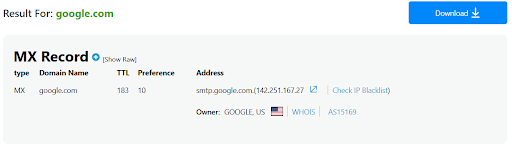
That's as simple as how it is to check MX records for domain. You can copy and download the MX record lookup results in the following file formats:
- Markdown
- Text
Why Do You Need to Check MX Records?
Checking MX records confirms how incoming email is routed for your domain and helps detect DNS misconfigurations. It also ensures mail servers, priority values, and TTL settings are correctly configured for reliable email delivery.
Below are the detailed reasons why to check MX records for your domain:
Ensure Email Delivery
Email servers rely on MX records to route messages. If the mail exchange records are incorrect, email delivery will fail. By checking the records, you can ensure they point to the correct mail servers and that emails reach the correct inbox without delay.
Avoid Email Failures
Email migrations or server changes often require MX updates. Checking these records helps confirm that DNS updates point to the new email servers correctly. However, this depends on whether the change records have propagated. To check the propagation status, use our DNS propagation checker.
Maintain DNS health
MX records form a core part of DNS. Missing or broken MX records often signal DNS misconfigurations that can disrupt email services.
Additionally, many spam filters check MX records to confirm domain validity. Proper MX setup improves trust and helps protect your domain from email abuse.
Check Correct Server Priority
The priority describes which email server is primary, which one is secondary, and so on. The capabilities and limits of various email servers vary, which is why different priorities are set. This helps to make sure that no server is overloaded and no emails are discarded.
Our MX record checker can be used to periodically check the priorities of the email servers to make sure that they are correctly entered.
Checking the TTL of the MX records
The TTL (Time to Live) is an important part of the MX record. It specifies how long a record must remain in cache before authoritative DNS servers can query it again. You can use our tool to check the TTL of the MX records and ensure it is not set too high or too low.
Frequently Asked Questions
What is an MX Record?
An MX record, or Mail Exchange record, is a DNS record type that directs incoming email to the mail servers specified for that domain. These records ensure emails are delivered to the correct servers.
What is the MX Record Level?
The “level” in an MX record is the same thing as the “priority.” The priorities of the various email servers indicate which are primary and which are secondary.
What does MX Priority Mean?
MX priority indicates which mail server configured in the domain's DNS is responsible for receiving incoming email first. The lower the priority number, the higher the preference. It means that incoming mail will first go to the server with the lowest priority number.
How to Check the MX Record?
To check the MX records for a domain, input the domain name into our MX lookup tool and press Enter. Within seconds, the tool retrieves the MX records configured for the domain and displays them on your screen. It’s that simple.
What Happens if no MX record Exists?
If no MX records are configured for a domain, email servers will not deliver incoming email to that domain.
Can a Domain have Multiple MX Records?
Yes, a domain can have multiple MX records. In fact, we administrators managing multiple email addresses under a single domain often use multiple MX records. It helps them with mail load balancing and ensures emails are delivered even if one mail server is down.