What is My ISP
Use our What Is My ISP tool to identify the Internet Service Provider associated with your public IP address. The tool automatically displays your ISP, organization, ASN, hostname, and approximate IP location.
Your Internet Service Provider (ISP):

 Not Detected
 Not Detected
Who Is My ISP Tool - Check Your Internet Provider Instantly
Our Find My ISP tool is a free online resource that helps you identify your ISP and answers the question, “Who is my internet provider?”. Using our ISP finder tool, you can also know details other than your internet service provider’s name.
The tool displays your ISP and related network information, along with basic browser and device details detected from your connection. These details include:
- Your IP address
- Organization name
- Host name
- ASN
- Location (approximate)
- Device Screen Resolution
- Browser in Your use
How Does an ISP Lookup Tool Work?
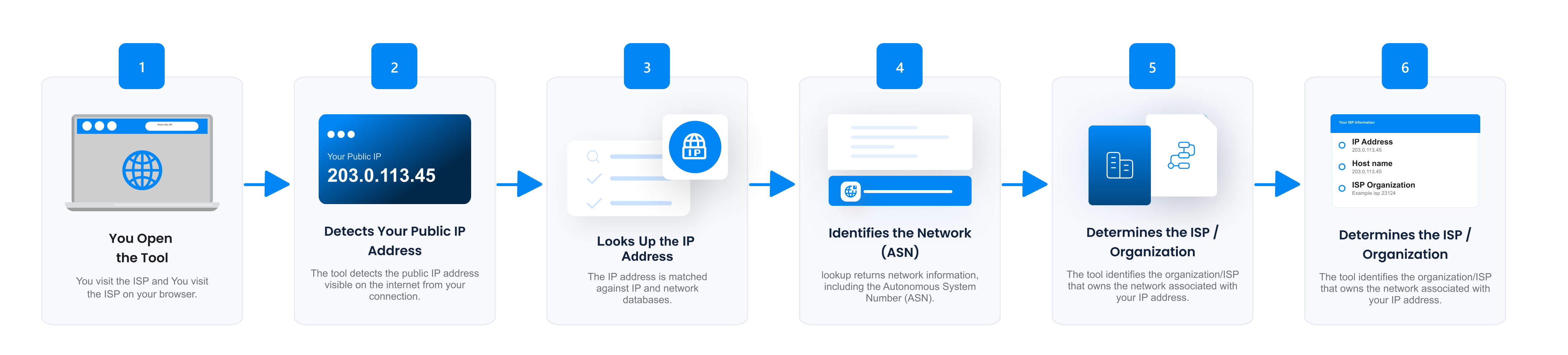
Our ISP lookup tool identifies the internet service provider associated with your public IP address. When you open the tool, it detects the IP address visible to the website and uses IP and network databases to determine the organization, network, and ISP associated with that address.
The process generally works as follows:
- Detects your public IP address: It identifies the IPv4 or IPv6 address your current internet connection uses to access the website.
- Looks up the IP address: The tool matches the IP address against network and IP registration databases that contain information about internet networks and organizations.
- Identifies the Network: This ISP lookup determines the Autonomous System Number (ASN) and organization associated with the IP address.
- Determines the ISP: Based on the available network information, the tool displays the ISP or network provider associated with your IP address.
- Displays Additional Information: The tool can also show related details such as your hostname, ASN, and approximate IP location.
The ISP shown by a Who is my ISP tool may differ from your usual internet provider if you are connected through a VPN, proxy, corporate network, mobile network, or other intermediary. In these cases, the tool typically identifies the network associated with the public IP address currently visible on the internet.
How to Check Your ISP?
If you are looking for the answer to “Whats My ISP”, then you are in the right place. Our check My ISP tool displays your internet service provider and other details as soon as you land on it.
There is no need to click or take any action. All the details related to your ISP are automatically fetched and presented to you.
Here’s how to check your ISP.
- Open the What Is My ISP tool.
- Allow the page to load completely.
- Your public IP address is detected automatically.
- Check the ISP/Organization field to identify the network associated with your IP.
- Review the ASN, hostname, and approximate location for additional network information.
As the What’s My ISP tool screen appears, you will see your internet provider name right at the front, next to Organization in the results table.
Why Should You Use Our Tool for ISP Lookup?
When connected to the internet and facing a problem like slow speed, the first thing that comes to mind is ‘Who Is My Internet Provider?’ That is where our What Is My ISP tool provides you with the name of your internet provider.
Here’s why you should use our tool for ISP Search.
-
Instant Results, No Action Required
As soon as you open our ISP checker, the tool automatically detects your public IP address and displays the available ISP and network information without manual input. No buttons to press, saving you effort and ensuring you get accurate results quickly.
-
More Than ISP Check
Unlike simple ISP checkers, our tool provides additional details, including your IP address, ASN, hostname, browser, and approximate location. These insights help you better understand your internet connection and even identify unusual activity.
-
Helps in Troubleshooting Internet Issues
By instantly checking your ISP and IP information, you can determine whether the issue lies with your internet service provider (ISP) or your device. This makes it easier to explain problems when contacting customer support.
-
Verify VPNs and Network Security
If you use a VPN, you can use our ISP finder tool to confirm whether it’s masking your ISP and showing the correct virtual location.
-
Free, Safe, and Accessible Anywhere
There’s no cost, no signup, and no software installation required. Our Who Is My ISP tool works error-free on all devices, including phones, tablets, and computers. Plus, it is secure; your data is only displayed to you and never shared with any external source.
Frequently Asked Questions
What is an Internet Service Provider (ISP)?
An internet service provider (ISP) is a company or organization that provides access to the internet. ISPs may deliver connectivity through fiber-optic, cable, DSL, fixed wireless, satellite, or mobile networks.
What Are the Different Types of Internet Connections?
There are various types of internet service providers. Here are some common ways ISPs provide internet access to you.
- Dial-Up: Old and very slow, hardly used now.
- DSL: Internet through telephone lines, faster than dial-up.
- Cable: Internet access through TV cables is common in cities and towns.
- Fiber-Optic: Super-fast internet using fiber cables, but it is not available everywhere.
- Satellite: Works anywhere, even in rural areas, but typically operates at a slower speed.
- Wireless (Fixed Wireless): The Internet is transmitted through radio signals from towers.
- Mobile Broadband: Internet through 3G, 4G, or 5G mobile networks.
The type you get usually depends on where you live and what’s available in your area.
Who is My Internet Service Provider?
Your internet service provider is the company or organization that provides your internet connection. To identify the provider associated with your current connection, use the What Is My ISP tool. It detects your public IP address and displays the associated ISP or network organization along with information such as ASN and hostname.
Can This My ISP Tool Tell My Exact Location?
No, our ISP lookup tool cannot determine your exact physical location from your IP address alone. IP geolocation generally provides an approximate location such as country, region, or city. Don’t treat it as a GPS-level location.
Is My Privacy Protected Using the Who Is My ISP Tool?
Our Who Is My Internet Provider tool displays network information associated with your current connection, such as your public IP address, ISP or organization, ASN, hostname, and approximate location. The information shown by a check my ISP tool should not be interpreted as your exact physical identity or location.
Can I Find My ISP From My IP Address?
Yes, you can find your ISP using an IP address. Just visit the My IP Address tool, and it will show you the ISP name among the results.
Does a VPN Change My ISP?
No. A VPN does not change your actual ISP. However, a VPN changes your IP address and how your internet traffic appears to websites.